 EN
EN

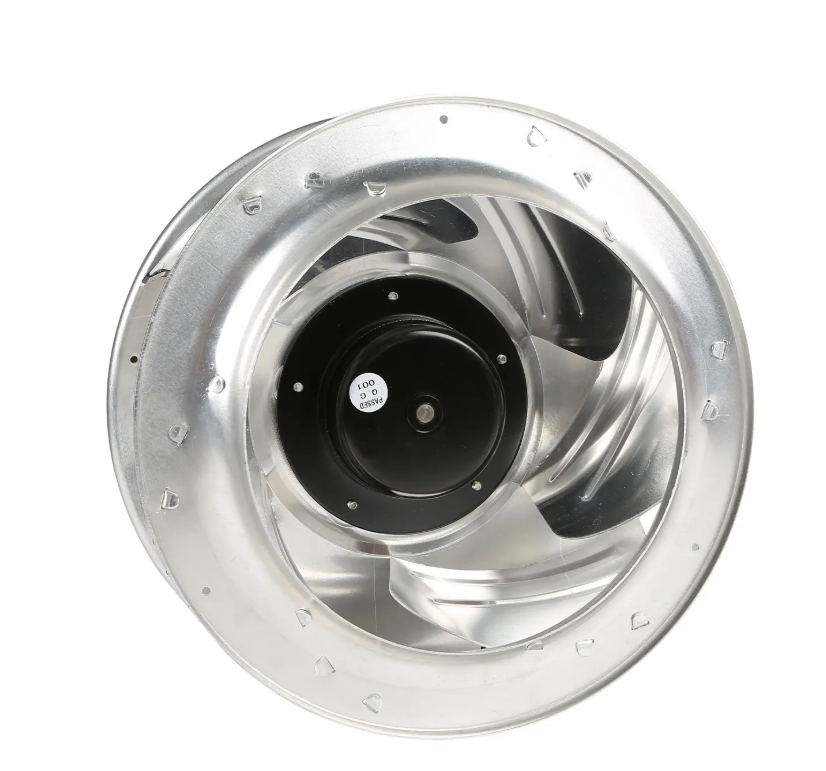
Curved fan blade designs are commercially dominant when you consider kitchen ventilation systems, industrial air cooling systems, and HVAC systems. These are not regular flat paddle fans. The fan's design is based on aerodynamics, so the fan is able to pull air in and push it out through the system efficiently and quietly, even when there are obstructions present. The unfortunate downside to the design is that the curved fan blades trap dust and grease in the pockets of the blades. This is problematic because neglecting this will lead to the fans consuming even more energy, and creating more noise. Dust and grease reduce fan efficiency, and increase noise levels. Cleaning dust and grease will reduce energy usage, and noise levels. Now let's look at how to clean the fan blades.
The Importance of Blade Design
Considering the shape of the blade, it is easy to see why this design is so prevalent. With either design, the blade undergoes a turning of some sort, which allows the air to be shed more efficiently. This also decreases turbulence and allows the fans to operate more quietly. Companies like Fanova have established a reputation for this style of design from the early 2000s, combining these blades with modern EC motor technology for cleanroom and data center cooling applications. As advanced as a blade design may be, it is a guarantee that some level of dirt and dust will collect on it. This grime will glaze the blade, changing its profile, even so slightly, and disrupts the aerodynamics of that blade. All of a sudden, that previously quiet fan will start making a bit more noise, and will have to work harder to move the same amount of air.
Guidelines for Blade Cleaning
How often should motor blades in fans be cleaned? You could check once each season, just about four times a year, give or take. If you live in a dusty area, maybe check every month. A little bit of dust overloads the blades in the fans. If you let dust buildup, that is worse. You are just going to end up calling in a cleaning service to scrub your fans.
Safety First, Always
Safety is a big concern that should be considered when cleaning fan blades. You do not want the blades turning when you are cleaning them. If the fan cleaning is part of a system, cleaning procedures should be followed when cleaned. Cleaning can begin when the system is safe for the fan to be running.
Initial Inspection: What to Look For
When it comes to blades, you want to look for dust, grease, or anything else that looks dirty. The different types of build-up you see here will determine your cleaning approach. For simple, dry dust, a brush vacuum combo will work wonders. Work just enough to break the dust so that it can be vacuumed up immediately. Work dust from the center of the blade to the tip, following the blade's curve. Take your time and remember that you are cleaning, not scraping.
Dealing with Stubborn Grease
Grease can actually be really hard to clean, with it usually needing some sort of special solution to get it fully clean, like a mild degreaser for example. If you are working in an environment like a kitchen, you really need to be careful about what you spray onto the fans since the motor and electrical parts can be dangerous. We also want to keep the spray from getting onto the parts that are sensitive. Instead of spraying the fan blades and motor directly, I suggest spraying a clean cloth with degreaser and using that cloth to degrease the blades. This will minimize the spraying. Take clean cloths for each blade so that you do not keep moving grease from one blade to the next.
Inspection Following Cleaning
Once the blades have been cleaned, it is a good idea to examine them again. Look for the presence of cracks, chips, or bends. An imperfection, such as a small nick on the end of the blade, can grow to the point where a blade can break off. This will be a catastrophic failure of the fan, and the blades should be inspected for this condition on a regular basis, especially for use in medical or transport ventilation, where reliability and fan blade integrity are highly critical.
Examining the Fan Assembly
Also, be sure to examine the rest of the fan assembly. The blades are fastened to a hub. The hub is attached to a motor shaft. Make sure all of the connections are tight. Look for evidence of rust on the shaft and mounting hardware. Examine the fan housing as well. Is there a build-up of dirt in the housing that would obstruct the flow of air? If so, wipe it down.
Bearing Health Check
It is also important to check the bearings, which can be harder to see and to hear. After cleaning the blades and before closing the assembly, try to spin the fan manually. Does the fan spin freely and smoothly? Or does the fan sound rough and grind? If the fan feels rough, that likely means the bearings are on their way out. If the bearings are worn, the cleaning that you did on the blades will not fix the vibration and noise because worn bearings continue to be the cause.
Test Run and Vibration Check
Speaking of vibration, once you power the fan back up, keep note of how it runs. Does it start up smoothly? Does it sound any different than it used to? If you can measure vibration, do it. If the cleaning process increased vibration, it means the cleaning process affected the impeller's balance. The even layer of dust acts as a temporary balance. When you remove it unevenly, you might introduce a wobble. If this happens, you might need professional balancing. Companies with engineering design specialization like Fanova, can do that kind of precision work, but it is usually a job for the factory or a specialized repair shop.
Utilizing Smart Motor Features
For people with fans that have modern EC motors, you may have an advantage. Many of these systems, such as the ones Fanova offers, provide smart control and monitoring capabilities. The system may be able to provide you with feedback regarding the motor drawing higher current, which could signal that the blades are dirty, or the bearings are starting to drag. Learning how to utilize these monitoring features can change your maintenance from time-based to condition-based maintenance, which saves you work and helps you identify issues proactively.
Assessing the Inlet Cone
In addition, you should routinely inspect the inlet cone or venturi, which is the ring that sits just in front of the blade tips. The clearance from the blade tips to this cone is typically very small. If the cone is misaligned or has an obstruction in it, the blades can contact it. This contact will generate noise, increase blade wear, and may even generate sparks. Ensure that area is unobstructed and that the clearance is even all around.
Keeping a Maintenance Log
Once everything is clean, reassembled, and operating properly, it is time to make a record of it all. Logs can be informal. Write a date, brief description of the service performed and any observations made. Did the fan seem a bit louder than it should? Write about it. It will be a useful document to reference in the future. You may notice that the fan in one of the units clogs every spring. This will tell you to schedule a clean out in the spring. Or maybe you notice that the vibration is gradual, meaning that a bearing has the potential to get bad before it locks up, giving you time to prepare.
When to Consider Replacement
Finally, if you ever find yourself in need of a replacement fan or a new unit entirely, just know that not all curved fans are made the same. Look for a long-standing reputable manufacturer. Fanova is a good choice, having over fourteen years in the industry and an impressive R&D department. Their ISO9001 and CE certifications indicate that their fans are designed to be both efficient and durable. They know that easy maintenance for a fan will keep it performing well for a long time.
Understanding the Value in Care
Ultimately, keeping the curved fan blades clean is a way of appreciating the design effort that went into making them. Based on their fan engineering, they clean, and cool, even in challenging environments. A few maintenance inspections, unobtrusive cleaning, and attentive fan listening during inspection will carry on that engineering design for years. It avoids losses, keeps your fan operating optimally, and it saves you money. So, grab a cleaning tool and give your fan a little care and it will give you back performance and reliability.
Table of Contents
- The Importance of Blade Design
- Guidelines for Blade Cleaning
- Safety First, Always
- Initial Inspection: What to Look For
- Dealing with Stubborn Grease
- Inspection Following Cleaning
- Examining the Fan Assembly
- Bearing Health Check
- Test Run and Vibration Check
- Utilizing Smart Motor Features
- Assessing the Inlet Cone
- Keeping a Maintenance Log
- When to Consider Replacement
- Understanding the Value in Care